website | twitter

Tuesday, April 28, 2009

A Prolog In Haskell

Prolog In Haskell

I have been obsessed by Prolog language recent weeks. While I first learned Prolog long time ago, and actually I was attracted, I have never used it fluently because it's too hard to get familiar without any practical necessity. Although, there are a lot of interesting literatures which require certain knowledge of logic programming in computer science. So, I decided to do another approach; writing a Prolog interpreter to learn Prolog.

I chose Haskell as the implementation language because of its succinctness. I'm a beginner Haskell programmer, and I thought it was also a good opportunity to learn Prolog and Haskell same time! The starting point was a Prolog implementation in Hug98 distribution http://darcs.haskell.org/hugs98/demos/prolog/. I think this is a great Haskell program, but its too difficult to me. Rewriting it as my level would be a good exercise.

Data structures

Here is my version of Prolog in Haskell. Entire program is about 200+ lines. There is no cut operator but it has a list notation so that you can write [apple, orange | banana] stile literal. Let's take a look at the first part.

module Prolog
    (Term(..), Clause(..), w, s, cons,
     parse, parse',
     atom, variable, struct, list, nil, terms, arguments, term, clause, clauses, query,
     display,
     unify, unifyList, applyTerm, prove, rename, solveString) where

import Text.ParserCombinators.Parsec
import Data.Maybe
import Char

I used Parsec as a parser, and defined some data structures.

infix 6 :-
data Term    = Var String Int | Struct String [Term] deriving (Show, Eq)
data Clause  = Term :- [Term]                        deriving (Show, Eq)
data Command = Fact Clause | Query [Term] | ShowAll | Noop

type Rules = [Clause]
type Substitution = [(Term, Term)]

Term represents Prolog's term like "apple" or "father(abe, homer)". It can be a variable, or a structure. A variable has an index number which I used it later to distinct a same variable name in different contexts. A simple term like "apple" is also represented as a structure without elements like Struct "apple" [].

Clause is a Prolog rule like "mortal(X) :- man(X)". I stole a user defined operator constructor ":-" from original Hugs' Prolog to write a Haskell expression in Prolog like. So "mortal(X) :- man(X)" in Haskell expression becomes Struct "mortal" [Var "X" 0] :- [(Struct "man" [Var "X" 0])]. Well, it's not quite nice. Although the parser will provide better notation later, I have to use this expression when debugging the interpreter meanwhile. Its cumbersome. So I made up tiny utility functions to make Prolog data easier.

-- Utility constructors for debugging
w :: String -> Term
w s@(x:xs) | isUpper x = Var s 0
           | otherwise = Struct s []

s :: String -> [Term] -> Term
s n xs = Struct n xs

cons s cdr = (Struct "cons" [w s, cdr])
Using this functions, now "mortal(X) :- man(X)" is written as s"mortal" [w"X"] :- [s"man" [w"X"]] . It is much better, isn't it?

Unification

By the way, I like the word unification. It sounds peace and spiritual! Unification is one of two most peculiar concept in Prolog (another one is the control structure by depth first search). Unification is solving a logical equation. For example, the answer of "[X, orange] = [apple, Y]" must be X = apple, and Y = orange. It is almost same as variable binding in a normal programming language, but tricky part is that a direction is symmetry, so X = Y and Y = X is same meaning. How can it be possibly implemented?? Think about the data structure of the answer at first.

---- Unification ----

type Substitution = [(Term, Term)]
true = []

I used a list of tuples of terms, or an associate list to represent a substitution. For example, "X = apple, Y = orange" is represented as [(X, apple), (Y, orange)] (in actual Haskell code, [(w"X", w"apple"), (w"Y", w"orange")] ). A tuple of left hand side is always a variable name, and right hand side is any term, concrete value preferably. The goal of unification is making associations with variable and term. To make this process easier, "transitive" substitution is allowed. Think about an equation "X = Y, Y = banana". It is represented like [(X, Y), (Y, banana)], which is solved as X = banana, and Y = banana in apply function. Let's look at the implementation.

-- apply [(w"X", w"Y"), (w"Y", w"Z")] [(w"X"), (w"Y")] == [(w"Z"), (w"Z")]
apply :: Substitution -> [Term] -> [Term]
apply s ts = [applyTerm s t | t <- ts]

applyTerm [] (Var y n)                                  = Var y n
applyTerm ((Var x i, t):s) (Var y j) | x == y && i == j = applyTerm s t
                                     | otherwise        = applyTerm s (Var y j)
applyTerm s (Struct n ts)                               = Struct n (apply s ts)

The function apply substitutes a variable name of its value. To support transitive apply, applyTerm is called recursively if the value is also a variable. But it can solve only one way. Think about opposite case "Y = banana, X = Y". Apply can't find the fact X = banana because "Y = banana" is appeared before. So what I should do is applying X = Y before adding the substitution.

EquationSubstitution(solution)
1Y = banana, X = Y
2X = YY = banana (append)
3X = banana (apply: Y = banana) Y = banana
4Y = banana, X = banana (append)

I suppose that this two fold way solve all of logical equation. Apply is always needed before append it to the solution. Actual source implementation seems to be complicated because there are cases where a variable can appears any side, and sometimes there is no solution. To represent no-answer case, a Maybe monad is used. So there are variations such as;

  • No Answer : Nothing
  • Always true (like apple = apple) : Just true (true is a synonym of empty list [])
  • Substitution found : Just [X = some answer...]
-- unify (w"X") (w"apple") == Just [(w"X", w"apple")]
unify :: Term -> Term -> Maybe Substitution
unify (Var x n) (Var y m) = Just [(Var x n, Var y m)]
unify (Var x n)      y    = Just [(Var x n,       y)]
unify      x    (Var y m) = Just [(Var y m,       x)]
unify (Struct a xs) (Struct b ys)
      | a == b = unifyList xs ys
      | otherwise   = Nothing

unifyList :: [Term] -> [Term] -> Maybe Substitution
unifyList [] [] = Just true
unifyList [] _ = Nothing
unifyList _ [] = Nothing
unifyList (x:xs) (y:ys) = do s <- unify x y
                             s' <- unifyList (apply s xs) (apply s ys)
                             return (s ++ s')

Note that I just use append (++) to add a new substation in unifyList. But if you design carefully, recursive apply is not necessary. Using something like a map is a better idea.

Solver

As a programming language, Prolog is unique as it has no explicit control structure. Instead, a Prolog program can be seen as a big nested if then else statement. This find and branch functions are implemented of this behavior. While unification is a technique of how to solve a equation, solver deals with when each equation should be solved. There are two most important concepts to understand control structures in Prolog.

  • Goals (AND relationship) : are terms which should be solved.
  • Branches (OR relationship) : are options which might have a solution

A proof's fate is decided by branch function, branch function returns a list of goals (with corresponding substitutions). If the list is empty, this branch is failed. If the list includes empty goal, it is actually succeed because empty goal means that it is unified against a fact like "food(apple).". Well, is it complicated?

  • If branch returns [] <--- this is failed
  • If branch returns [ [some goals] [some goals] [(empty)] <--- this is succeed! ]
The goal of find function is traverse all of goals to find whether if it is true or false.
---- Solver ----

prove :: Rules -> [Term] -> [Substitution]
prove rules goals = find rules 1 goals

-- Depth first search
-- find (parse' clauses "p(X):-q(X). q(a).") 1 [parse' term "p(X)"]
find :: Rules -> Int -> [Term] -> [Substitution]
find rules i [] = [true]
find rules i goals = do let rules' = rename rules i
                        (s, goals') <- branch rules' goals
                        solution <- find rules (i + 1) goals'
                        return (s ++ solution)

-- Find next branches. A branch is a pair of substitution and next goals.
-- branch (parse' clauses "n(z). n(s(X)):-n(X).") (parse' query "?-n(X).")
branch :: Rules -> [Term] -> [(Substitution, [Term])]
branch rules (goal:goals) = do head :- body <- rules
                               s <- maybeToList (unify goal head)
                               return (s, apply s (body ++ goals))

Find function has an argument for index number to show the depth of the tree. This number is used to rename all variables used in whole rules. This is necessary because same variable name in different clauses are actually represented different variables.

-- Rename all variables in the rules to split namespaces.
rename :: Rules -> Int -> Rules
rename rules i = [ renameVar head :- renameVars body | head :- body <- rules]
    where renameVar (Var s _)     = Var s i
          renameVar (Struct s ts) = Struct s (renameVars ts)
          renameVars ts           = [renameVar t | t <- ts]
I have only explained evaluator part of the REPL, but still there are reader, printer, and loop. You can browse and download whole source code from http://github.com/propella/prolog/tree. Someday I might write some of interesting topics in the program...

Sunday, April 05, 2009

Learning Erlang and Adobe Flash format same time part 2

I have already written most important part about SWF format and Erlang's bit syntax at previous post. But just for the record, I take a note of miscellaneous knowledge to construct an interesting Flash shape. This entire note doesn't have any practical value because there are already many other useful libraries to build a swf file. But some of historical esoteric magical peculiar internal might interests you.

In the previous example, I only made three control tags:

  • End (Tag type = 0)
  • ShowFrame (Tag type = 1)
  • SetBackgroundColor (Tag type = 9)

Here, I introduce you two additional tags,

  • DefineShape (Tag type = 2) defines a vector graphics, and
  • PlaceObject2 (Tag type = 26) shows the graphics to an actual screen.

I designed new data structure to represent a SWF shape. While spec/0 is almost same as previous program, I add sample_shape/0 to define DefineShape.

% an example shape.
spec() ->
    {{frame_size, 6000, 3000},
     {frame_rate, 16},
     {frame_count, 160},
     [{set_background_color, {rgb, 240, 250, 250}},
      sample_shape(),
      {place_object2, 1},
      {show_frame},
      {end_tag}]}.

sample_shape() ->
    {define_shape,
     {shape_id, 1},
     {bounds, {rectangle, 2000, 3000, 1000, 2000}},
     {shapes, {{fills, [{solid_fill, {rgb, 50, 200, 50}}]},
        {lines, [{line_style, 100, {rgb, 100, 255, 100}},
   {line_style, 100, {rgb, 50, 150, 50}}]},
        {shape_records,
  [{style_change, [{move_to, 2000, 2000}]},
   {style_change, [{line_style, 1},
     {fill_style0, 1}]},
   {straight_edge, 0, -1000},
   {straight_edge, 1000, 0},
   {style_change, [{line_style, 2},
     {fill_style0, 1}]},
   {straight_edge, 0, 1000},
   {straight_edge, -1000, 0},
   {end_shape}]
        }}}}.

It looks complicated though, it is actually very straightforward. A DefineShape has a shape ID (or character ID), its bounding box, and actual shapes. "shape_id", "bounds", and "shapes" tuples at sample_shape/0 denote these information. Shape ID is used later for a reference by PlaceObject2.

A Shapes part consists of further sub elements, fills, lines and shape records. Every style information are defined in advance, and referenced with corresponding ID. In this case, one solid fill and two line styles are defined. After styles are defined, shape records are followed. A shape record is the most interesting and complicated part. I'll draw a moss green rectangle in 1000 x 1000 twips (20 twips = 1 pixel) with light and dark green borders in a pseudo 3-D style.

This is an actual implementation of DefineShape and PlaceObject2. I'm afraid it seems to be complicated, but it is just a direct translation from the specification. Thanks to Erlang's pattern matching syntax, It is easy to add a new tag by putting a new pattern. But sometimes distinction between ; (semi colon is used between patterns in a function) and . (dot is used after a function definition) annoys me.

tag({define_shape,
     {shape_id, ShapeId},
     {bounds, Bounds},
     {shapes, ShapesWithStyle}}) ->
    BoundsBits = rectangle(Bounds),
    Shapes = shape_with_style(ShapesWithStyle),
    record_header_body(2, list_to_binary([<<ShapeId:16/unsigned-little>>, BoundsBits, Shapes]));

tag({place_object2, CharacterId}) -> 
    PlaceFlagHasClipActions = 0,
    PlaceFlagHasClipDepth = 0,
    PlaceFlagHasName = 0,
    PlaceFlagHasRatio = 0,
    PlaceFlagHasColorTransform = 0,
    PlaceFlagHasMatrix = 0,
    PlaceFlagHasCharacter = 1,
    PlaceFlagMove = 0,
    Depth = 1,
    record_header_body(26, <<PlaceFlagHasClipActions:1,
       PlaceFlagHasClipDepth:1,
       PlaceFlagHasName:1,
       PlaceFlagHasRatio:1,
       PlaceFlagHasColorTransform:1,
       PlaceFlagHasMatrix:1,
       PlaceFlagHasCharacter:1,
       PlaceFlagMove:1,
       Depth:16/unsigned-little,
       CharacterId:16/unsigned-little>>).

shape_with_style/1 is used to construct SHAPEWITHSTYLE structure in the specification.

shape_with_style({{fills, Fills}, {lines, Lines}, {shape_records, Shapes}}) ->
    FillBits = nbits_unsigned([length(Fills)]),
    LineBits = nbits_unsigned([length(Lines)]),
    ShapeRecords = shape_records({shape_records, Shapes}, FillBits, LineBits),
    [fill_style_array({fills, Fills}),
     line_style_array({lines, Lines}),
     <<FillBits:4,
      LineBits:4>>,
     ShapeRecords].

The tricky part is FillBits and LineBits. As I have already mentioned when explaining a rectangle format in previous post, the SWF format tries to shorten a file size by all means, bit by bit. FillBits defines maximum bit size needed by fill style id. For example, if you use only one fill style, one is enough for FillBits. But if you use seven, FillBits is three (because seven is 111 as a binary). After FillBits and LineBits are calculated, they are needed in next helper function shape_records/3. But before I show you shape_records/3, some simple functions to construct styles are followed.

fill_style_array({fills, FillStyleArray}) ->
    FillStyleCount = length(FillStyleArray),
    [<<FillStyleCount:8>>, [fill_style(X) || X <- FillStyleArray]].

fill_style({solid_fill, RGB}) -> [<<16#00:8>>, rgb(RGB)].

line_style_array({lines, LineStyleArray}) ->
    LineStyleCount = length(LineStyleArray),
    [<<LineStyleCount:8>>, [line_style(X) || X <- LineStyleArray]].

line_style({line_style, Width, RGB}) ->
    [<<Width:16/unsigned-little>>, rgb(RGB)].

I think these are straightforward. Perhaps, next is the most tricky part of the SWF shape. Shape records include a number of records, each record represents style change or position change or so. While a rectangle format must to be byte aligned, each record must not be aligned, but whole shape records including them must be aligned! This fact is described in the specification very obscure way, so I didn't find out what to do unless many try-and-errors. Although, I might misunderstood what is a shape record...

Each individual shape record is byte-aligned within an array of shape records; one shape record is padded to a byte boundary before the next shape record begins. --- SWF File Format Specification Version 10

To concatenate many bit strings into one, and align whole bits, I made two functions padding/1 and concat_bits/1 (padding/1 is same one as previous post). It is likely that concatenating bitstrings exists already, but I couldn't find out from the library.

shape_records({shape_records, ShapeRecords}, FillBits, LineBits) ->
    padding(concat_bit([shape_record(X, FillBits, LineBits) || X <- ShapeRecords])).

padding(Bits) ->
    Padding = 8 - bit_size(Bits) rem 8,
    <<Bits/bitstring, 0:Padding>>.

concat_bit(XS) -> lists:foldl(fun(X, Y) -> <<Y/bitstring, X/bitstring>> end, <<>>, XS).
Rest of the source is definitions of each record. I omitted a lot of features to the explanation purpose. EndShapeRecord and StraightEdgeRecord are quite simple.
shape_record({end_shape}, _, _) -> <<0:1, 0:5>>;

shape_record({straight_edge, DeltaX, DeltaY}, _, _) ->
    NumBits = nbits_signed([DeltaX, DeltaY]),
    GeneralLineFlag = 1,
    <<1:1, 1:1, (NumBits - 2):4, GeneralLineFlag:1, DeltaX:NumBits, DeltaY:NumBits>>;

But StyleChangeRecord is the second tricky and daunting part in spite of Erlang's succinct syntax. A part of reasons of the complexity is that StyleChangeRecord allows to define a couple of operations at once optionally; line style, fill style, and pen move. So we need some data structure to represent such option.

In object oriented languages, a dictionary or a map is commonly used while an associated list is popular in functional languages. In Erlang, a list of tuples might be enough. lists:keysearch/3 find a tuple in a list where first argument is matched, so we can use it as a dictionary like structure. In our example, [{line_style, 1}, {fill_style0, 1}] means we want to change line style and fill style same time. and lists:keysearch(line_style, 1, ChangeSpec) detects a line style change option.

shape_record({style_change, ChangeSpec}, FillBits, LineBits) ->
    TypeFlag = 0,
    StateNewStyles = 0,
    StateFillStyle1 = 0,

    {StateLineStyle, LineStyleData} =
 case lists:keysearch(line_style, 1, ChangeSpec) of
     {value, {_, LineStyle}} -> {1, <<LineStyle:LineBits>>};
     false -> {0, <<>>} end,

    {StateFillStyle0, FillStyle0Data} =
 case lists:keysearch(fill_style0, 1, ChangeSpec) of
     {value, {_, FillStyle0}} -> {1, <<FillStyle0:FillBits>>};
     false -> {0, <<>>} end,

    {StateMoveTo, MoveData} =
 case lists:keysearch(move_to, 1, ChangeSpec) of
     {value, {_, MoveDeltaX, MoveDeltaY}} ->
  MoveBits = nbits_signed([MoveDeltaX, MoveDeltaY]),
  {1, <<MoveBits:5,
       MoveDeltaX:MoveBits/signed,
       MoveDeltaY:MoveBits/signed>>};
     false -> {0, <<>>} end,

    <<TypeFlag:1,
     StateNewStyles:1,
     StateLineStyle:1,
     StateFillStyle1:1,
     StateFillStyle0:1,
     StateMoveTo:1,
     MoveData/bitstring,
     FillStyle0Data/bitstring,
     LineStyleData/bitstring>>.
I uploaded final program http://languagegame.org/pub/swf.erl.

Friday, March 27, 2009

Learning Erlang and Adobe Flash format same time

Since Luke Gorrie encouraged me to learn Erlang, I have been playing with a bit with the language. One of the most attracting points is bit syntax. When you want a byte array with 65, 66, 67. I can write it as <<65,66,67>>. Further more, When you want a bit pattern of 4 in four bits, 1 in four bits and 0x4243 in 16 bits, you may say <<4:4, 1:4, 16#4243:16>>. What a cool!

$ erl
Eshell V5.6.4  (abort with ^G)
1> <<65,66,67>>.  % numbers are printed with ASCII
<<"ABC">>
2> <<4:4, 1:4, 16#4243:16>>.
<<"ABC">>

I was soon tempted to build a meaningful binary data with this syntax. What does suit? Adobe Flash format would be the weirdest and coolest. It's weirdest because of very bits oriented taste by perhaps historical reasons. It's coolest because it's popular. I want to show you how Erlang is powerful by writing complicated SWF format in the sophisticated syntax. Fortunately, the SWF specification is now free and everybody can write a flash editor by themselves.

First of all, I chose scripting style because I'm too lazy to wait for a compiler. And I start a shell bang line.

#!/usr/bin/env escript
%% -*- erlang -*-
%%! debug verbose

I don't understand how it works, but I just copied from the manual. And then, I have to decide what my first flash file looks like. I'm modest enough to satisfy just a salmon colored window. This is a spec file representing my flash.

% an example flash contents.
spec() ->
    {{frame_size, 2000, 3000},
     {frame_rate, 10},
     {frame_count, 10},
     [{set_background_color, {rgb, 250, 100, 100}},
      {show_frame},
      {end_tag}]}.

This is already reflected by the structure of a flash file. A flash file starts with meta data of file size, frame rate, and frame count. And a bunch of tagged data are followed. Tagged data is the key of extensibility of the flash format. You can embed various kinds of media as various type of tags in a file. In Erlang, fixed sized data is represented as {tuples}, and variable sized data is [lists]. I write each element as {key, arg1, arg2, ...} style, and tags are represented as a list. You might understand each tuple's meaning. You can change the color or size if you like.

Rest of the program reads this data and write a SWF file. I'll explain the program in a top down fashion. The simple main function opens a file and write something. Actual data is created by swf/0 (name/arity is Erlang's way to point to a function) as a sequence of binary.

main(_) ->
    Filename = "simple.swf",
    {ok, S} = file:open(Filename, [binary, write]),
    file:write(S, swf(spec())),
    file:close(S).

Now interesting part begins. If you read Chapter 2: SWF Structure Summary in the SWF specification, you may find that the Erlang program is much more concise and easier to understand than long description in the specification (although, I admit that I omitted some details). Especially, a bit syntax part is obvious, "FWS" is three byte characters, 'Version:8/unsigned-little' is a 8 bits integer for version number, and 'FileLength:32/unsigned-little' follows as a 32 bits little endian unsigned integer for file length. 'Rest/binary' looks tricky, but it means that another binary data Rest is embedded here.

% SWF Structure

swf(Spec) ->
    Version = 10,
    Rest = swf_rest(Spec),
    FileLength = size(Rest) + 8,
    <<"FWS",
     Version:8/unsigned-little,
     FileLength:32/unsigned-little,
     Rest/binary>>.

Because I needed to know the file size in advance, I had to split the main part in two. Swf_rest/1 composes every elements in data, and swf/1 mesures its file size and puts to the top. To pass my sample data to swf_rest/1, I use patterns. Thanks to to tuples and patterns, I don't have to remember an order of arguments. It looks like keyword arguments and more generic. Note that words begins with a lower case like 'frame_size' are symbols and words begins with a capital like 'Width' are variables in Erlang, in my case, 2000 is set to Width. In SWF file, a special unit 'twips' is used, 20 twips are a pixel.

A list comprehensions is another useful feature. I only used it as a shorthand of "map" function like [tag(X) || X <- Tags], which means apply tag/1 function to each element in Tags, but it saved many typing.

swf_rest({{frame_size, Width, Height},
   {frame_rate, FrameRate},
   {frame_count, FrameCount},
   Tags}) ->
    FrameSize = rectangle({rectangle, 0, Width, 0, Height}),
    FrameRateData = fixed8dot8(FrameRate),
    TagsData = list_to_binary([tag(X) || X <- Tags]),
    <<FrameSize/binary,
     FrameRateData/binary,
     FrameCount:16/unsigned-little,
     TagsData/binary>>.
Let's take a look at some detail of data type used in SWF. Color is simple, it is just an array of three bytes for Red, Green, and Blue. The description of 16-bit 8.8 fixed-point number in the specification looks very complicated, but it just said that you have to put the integer part last.
% Basic Data Types

rgb({rgb, R, G, B}) -> <<R:8, G:8, B:8>>.

fixed8dot8(N)->
    IntegerPart = trunc(N),
    SmallPart = trunc((N - IntegerPart) / 1 * 256),
    <<SmallPart:8, IntegerPart:8>>.

This is my favorite part. Rectangles are stored as very bit-oriented way. First, you must get a enough bit size to store each element (Nbits). Second, four elements are stored in this bit size. Third, entire bits should be byte-aligned. This kind of tasks are very tricky in other languages, it require a lots of shifts, ands, ors, etc. But Erlang's bit syntax helps me a lot.

I wrote two (actually three) helper functions to make rectangle/1 simpler. nbits_signed/1 calculate enough bit size for a list of signed integers, and padding/1 fills zeros to align byte width. '/bitstring' is same as '/binary', but you can use it for any odd size of bits data while binary works only byte arrays.

rectangle({rectangle, Xmin, Xmax, Ymin, Ymax}) ->
    Nbits = nbits_signed([Xmin, Xmax, Ymin, Ymax]),
    padding(<< Nbits:5,
      Xmin:Nbits/signed-big,
      Xmax:Nbits/signed-big,
      Ymin:Nbits/signed-big,
      Ymax:Nbits/signed-big>>).

nbits_unsigned(XS) -> % Necessary bits size for a list of integer values.
    Max = lists:max([abs(X) || X <- XS]),
    trunc(math:log(Max) / math:log(2)) + 1.
nbits_signed(XS) -> nbits_unsigned(XS) + 1.

padding(Bits) ->
    Padding = 8 - bit_size(Bits) rem 8,
    <<Bits/bitstring, 0:Padding>>.

Tags are the most important data structure in SWF. There are short and long tags. Short one is used for 62 bytes of data or less. Because tag code and length is packed in one place, you can save precious 16 bits space with short tag! Tricky part is here. In short tag, type code and length are stored respectively 10 bits and 6 bits, however, you have to save it as whole 16 bits integer in a little endian.

Big endian
|Type               |Length     |
|9|8|7|6|5|4|3|2|1|0|5|4|3|2|1|0|

Little endian
|Typ|Length     |Type           |
|1|0|5|4|3|2|1|0|9|8|7|6|5|4|3|2|
What a crazy?! (actually, it is not so strange than it looks if you see carefully. Hint: bits runs right to left, bytes runs left to right). Even these funny endianess conversion is handled easily in Erlang because bit syntax can be used in patterns (input).
% Tag Format

record_header_body(Type, Body) -> record_header_body(Type, Body, size(Body)).

record_header_body(Type, Body, Length) when Length < 63 ->
     <<TagCodeAndLength:16/unsigned-big>> = <<Type:10, Length:6>>,
    [<<TagCodeAndLength:16/unsigned-little>>, Body];

record_header_body(Type, Body, Length) ->
    <<TagCodeAndLength:16/unsigned-big>> = <<Type:10, 63:6>>,
    [<<TagCodeAndLength:16/unsigned-little>>,
     <<Length:32/unsigned-little>>,
     Body].
Finally, I'll show you the format of actual contents. Now I have only three tags for End (type=0), ShowFrame(type=1), and SetBackgroundColor(type=9). You might easily add new tags to support more convincing flash contents. Latest tag number is 91 for DefineFont4, see APPENDIX B Reverse index of tag values in the specification.
% Control Tags

tag({end_tag}) -> record_header_body(0, <<>>);
tag({show_frame}) -> record_header_body(1, <<>>);
tag({set_background_color, RGB}) -> record_header_body(9, rgb(RGB)).
I uploaded an entire program at swf_simple.erl Erlang is famous for its concurrent programming model, but I found another aspects like bit syntax and pattern matching are also attractive and useful to real application.

Monday, October 06, 2008

Inspy from Turtle Geometry

Turtle Geometry by Harold Abelson and Andrea diSessa has a lot of interesting examples of turtle graphics. Especially I was fascinated "inspy" program. The basic structure of inspy is same as spiral. But instead of the side, value of the angle is changed in each step. I have explored a bit for a demo of Chalkboard project http://tinlizzie.org/chalkboard/#Inspi.

To make the study easier, I made a trick to connect an event handler and an inspy program. You can play with a dynamic version of inspy program with it (Please move the mouse on next rectangle). And you may find various patterns even from such simple program. Here I present stand alone version (Only Firefox and Safari are supported).

inspy
inspi = function(side, angle, inc) {
  for (var i = 0; i < 720; i++) {
    forward(side)
    right(angle + inc * i)
  }
}
inspi(15, mouseX(), mouseY())

Tuesday, September 23, 2008

Ostranenie - Crossover between Art and Programming

It looks like that I have to say something at a camp next week. So I trumped up the most easy topic for me, the art. For me, the art is very common and familiar thing that I spent a lot of time to discuss such matter in my youth. And more importantly, it is somewhat strange topic for colleagues. I hope it will be fun.

One of the most important functions in the art is ostranenie. Ostranenie is a term coined by Russian critic Shklovsky, which means looking a familiar things in unfamiliar ways to find a unexpected side of the subject. For example, most surprising thing for a student who learns a sketch first time was there are no outlines in the world. Young kids often draw an outline to express the mom's face. But reality is that a human brain extracts an outline from a contrast of of light and shade.

Also a programmer often faces ostranenie. A human tends to think based on an intuition. But a computer only obeys logics, it never cares about human's common sense or intuition. The conflict often cause errors. But the errors give us precious ideas that we have never noticed. Human beings have developed common sense and intuition through the long history and culture, so it is very difficult to perceive a difference between logic and intuition without a computer.

We can regard the invention of computer in philosophy as the invention of photograph in the history of art. The invention of photograph provided an artist first different eyes beside human's. And it brought Impressionism in 19th. Likewise, we met another kind of brain for the first time by computers. No one knows what is born from there because the history of computer is still young. But we can explore new directions in terms of ostranenie.

Thursday, September 11, 2008

Chalkboard

Chalkboard

Chalkboard is my latest web authorizing tool for active essay. I have just uploaded it here http://tinlizzie.org/chalkboard/. I tested both Firefox and Safari. I know there are still a lot of UI / technical issues though, I am sure that basic feature is enough for my purpose, and I will keep it simple.

My biggest concern at now is supporting Internet Explorer. I thought it was not so difficult for such a simple web application. But actually it was horrible! and I couldn't solve yet. I might go bad direction though, I was really disappointed about different behavior of layout. One can say that it is unnecessary to support various platforms for such an experimental project. But I think it is important because I hope it will get real users finally.

When I had to decide a name of directory for this project. I named it "chalkboard". I felt the spell was too long as a directory name, but I'm comfortable about this naming now.

Here are features.

The screen have three areas, editor, play area, and transcript. You can write text or source code on the editor. Any text is executed as a JavaScript program with [do it] or [print it] command. [do it] command prints the answer on the transcript, and [print it] shows the answer on the point of cursor. The play area provides a free space to user. It is used any purpose, for example, you can make a drawing tool to attach canvas element on it. See http://tinlizzie.org/chalkboard/#Scribble.

The Chalkboard includes a bunch of pages. Each page consists text and source code. Sauce code is usually written on <pre> tag.

All source codes written on <pre> tag in a page are invoked with [run] from top to bottom. This is useful when you encounter unknown page, and want to try at first. <pre> tag is used when the project is called by includes function. See http://tinlizzie.org/chalkboard/#Polygon

You can make a new page to specify new name after hash mark of the URL like http://tinlizzie.org/chalkboard/#NewPage. In this case, a page named NewPage will be made.

Here are some design decisions.

The editor allows only paragraph level editing. You can make a line become h1 (header 1), p (paragraph), or pre (program), but you cannot make a word become bold or italic. Link command is only exception case (you can make a word become a link). The reason is web browsers have different behavior on the editor component, and I don't want to support each corner case. Rather than that, decided to provide minimal set of features.

Chalkboard uses IFRAME + editorMode property for the rich text editor. There were another possibility. One is DIV + contentEditable, and another one is FRAMESET. Those were pros and cons. I use IFRAME simply because it was easiest way in Firefox and Safari to make available this layout configuration, but I might change my mind.

Tuesday, September 02, 2008

My personal history of Web Authorizing Tools (2)

Tinlizzie Wiki

Tinlizzie Wiki is a wiki written in Tweak. It uses OpenDocument Format (ODF) as data format, and WebDAV as server.

Although data format in StackWiki was Squeak specific binary, In Tinlizzie Wiki existing common format is used. A part of reason why I choose ODF was that it was a research project to find a possibility to exchange eToys content among different platform. So it was necessary to find platform independent and transparent format. ODF, especially its presentation format, was quite close to my demonds which are a) text based b) enable to embed graphics c) enable to use original element d) internal and external link supported.

A ODF file is just a zip archive which includes XML text and multimedia binary files. And it is easy to extract image file in a project by an another tool. Both embeded object and external resource can be represented by common URL notation. And if necessary, new tag for Tweak specific object can be used. For example, a project which includes fully dynamic behavior written as Tweak objects can be viewed on ordinary OpenOffice Org application, although dynamic feature would in it be disabled.

To export Tweak object to ODF as natural as possible, special care was needed to save. It is not the best way to define a new tag for Tweak specific object even though it is possible. It was preferable to map from Tweak to ODF properly. For example, if a Book object in Tweak is stored as a presentation within frame in ODF, the project looks somewhat more normal even on other application.

There is a issue how much detail information is needed to save an object. For example, if a text is saved during its editing, whether if position of the cursor should be saved or not?? There are two strategy in terms of implementation. One is to save everything except specified status (deep copy), another one is to save only specified status. Tinliziie Wiki adopted the latter one although Squeak and Tweak native serialize mechanism were the former.

Saving only specific status has two disadvantages. a) A user might expect to save everything including minor information because combining arbitrary objects in even any peculiar way is possible in Tweak. b) Each new widget needs to implement each exporter. But "saving everything by default" strategy has a problem of compatibility because even just one change of variable name makes trouble for old version. Especially it is problematic for sharing in Internet. So I din't choose this strategy.

WebDAV is used as the server. Both StackWiki and Tinlizzie doesn't need server side logic, but simple storage is required. WebDAV is the best option for that matter. Even version control system can be plugged in the server with Subversion modlule in Apache for free,

Javascript Workspace

Javascript Workspace is a simple web application. It uses bare Javascript on client, and Ruby CGI on server. It behave like a Smalltalk Workspace, and the contents are managed same manner as Wiki.

Let me make sure about workspace again. Workspace is a text editor, and it has two additional commands "do it" and "print it". Do it command envokes a source code selected by user, and print it command output the result into cursor position. The function is similar to REPL shell on dynamic language, but the use case is slightly different. A typical way to use workspace is as an explanation of program. An author writes example source code inside the documentation, so that a user can try actual function while reading a text. Namely, REPL is two ways dialog between a machine and a human, but workspace is tree ways conversation among a machine, an author, and a user.

Workspace is indispensable tool for Smalltak though, which doesn't mean only for Smalltalk. It would be nice if there is a workspace for Javascript language. This was the initial motivation of Javascript Workspace. And then, it was a natural consequence that Wiki was used to save the content because Javascript lives on web browser intrinsically, and there are no way to save to local disk.

During the development, however, I realize that it can be more than just a workspace in terms of media. Javascript workspace has only simple user interface, which includes a couple of buttons and one big text area. Even there are no hyper link nor emphasized text. But variety things can be happend from such minimal configuration by source code. Hyper link is enable to make from location property, rich text can be shown to modify DOM tree, and even game can be made to set up event hander. Source code can do everthing.

Just one textbox on a web page is a very radical idea. This is completely opposite direction to current trend of rich internet application. Web application consists with number of hidden functions these days, but Javascript Workspace can not have any invisible information. Everything what it does is shown to you as source code entirely on the screen. Javascritp Workspace looks like dangerous as it runs any Javascript code, but in fact, it is a quite safe system.

The idea of uset interface of Javascript Workspace is adopted to OMeta/JS.

TileScript

TileScript uses Scriptaculous as GUI library and WebDAV for server storage. JSON is used for its data format.

A TileScript document consists with one or more paragraphs, and a paragraph is either Javascript code, "tile script", or HTML expression. A tile script is set of tiles, which each tile represents some syntactical element in a programming language. A user can connect tiles to construct a program with drag and drop. This is an easy way to make a program avoiding syntax error. Javascript is used to represent more complicated program than tile script. And HTML is used as annotation. It can be seen as rich version of Javascript Workspace.

The initial motivation of TileScript was to remake eToys on the web environment. The research had got started by making tile available on web browser. I considered to use Lively Kernel (SVG), but it was unnecessary if Table element in HTML DOM is used as tile. Scriptaculous is used to keep the source code simple.

After tile is ported, then next step was eToys environment itself which includes event handling, scheduling, and bitmap animation, etc. But those issues seemed too difficult for nature of web document.

Flow layout, which actual position of document elements are dynamically changed by reader's browser environment, is a significant feature of web. An author don't specify concrete position of elements, but rather care about logical structure. And then, a part of document which can not be shown on the screen is accessable by a vertical scrool bar.

On the other hand, eToys provides page layout, which size and position of elements is fixed, and presume particular screen size. Althogh, it is quite fit as a metaphor of physical paper, and best for a graphical environment like eToys, but clumsy operation like zooming and horizontal scrool is required.

Because ultimate goal of TileScript was not just reinventing eToys, but investigating further possibility, flow layout is adopted to TileScript. But still absolute coordination can be supported in form of embeded object even in flow layout. TileScript provides variable watcher like eToys, but those widget is also layouted along with flow.

And then

Now I'm working on next version of Javascript Workspace, which especially its target application is Active Essays. Our group have found that Javascript is quite reasonable tool to show some ideas of computer science. One reason is language's simplicity, and other one is easiness of collaboration. We have a lot of new ideas about programming language, and some of the part should be simple enough to understand even by junior high student. I believe my tool can be used to explain such ideas.

The problem is any project intoroduced here is not intended for real use, rather just for demo or prototype of further real development. So it is not be so useful as it looks because it includes too experimental aspect, too fragile, or too slow. Now I'm thinking that it is not bad idea if I make somewhat stable version of them. Even it might not have exotic feature like tile script, but only basic and simple functions are enough to play with everyone. I really like my first idea of Javascript Workspace, which has only simple text. I admit it is extreme, so next version might support emphasized text and inline image (basic HTML elements) at least.

My personal history of Web Authorizing Tools (1)

I have been facinated by the idea of combining web authorizing and programming even before I realize it is called Active Essay. Actually I made a numbers of projects along with the idea. Here is a short story of my side.

Scamper Workspace

Scamper Workspace is a extention for Scamper, a web browser written in Squeak. It runs a Smalltalk code on any web page with simple operation.

I often write a tiny source code in Squeak on my blog. And it is natural that you want to run the code without any effort. Usually, you might have to copy and paste from web browser to Squeak. However, although Squeak has already a web browser named "Scamper", why do we need such clumsy way? What's wrong if a web page is just a text as same as other Squeak's text object, and if you can use full features which Squeak IDE has on it. Scamper has very limited as a web browser, but it is just O.K. to examine a code on blog. Only missing thing is a direct way to execute code on web page.

"No Application" is Squeak's original motto. Squeak consists with a number of objects that they have each different tiny functions, and those are connected naturally. In that sense, there are no need of "Application" because application is just an artificial boundary. So it seems to me natural to add Workspace menu into Scamper.

Because all necessary code is already available in Squeak image. The implementation was very easy. However the result was surprisingly attractive and profound. Thoru Yamamoto made a lot of contents for Scamper Workspace and each of them are so exciting.

Typical page written for Scamper Workspace consists with a short story and a couple of codes. A reader would executes the codes while reading a story. This format is very effective when the story is to explain how to make a graphical program in Squeak. Especially the fearure is emphasized when a page consists only text and source code. Even it lookes if it were 1995's website, it make large variety of effects if you run the code. I would say that it could be another possible evolution path for the Web.

StackWiki

StackWiki is a multimedia authorizing tool written in Squeak. Document is saved as original binary format with Swiki Server.

I made StackWiki inspired by Zest and Marmalade. Zest is WYSIWYG authoring tool like Wiki uses local disk, which allows you to make link to other page, and dynamic content in Smalltalk language. Above all, StackWiki emphasis more features in HyperCard and Wiki.

A StackWiki project consists with one or more pages. In WWW, nomally relationship between pages is maintained only hyper link, but there is no structure like hierarchy or order. Some websites attempt to show such structure with navigation link.

Structure among pages helps user to know a point within the context though, it often makes UI complicated. Addition to historical navigation, forward and backword navigation is needed if pages have an order. Above all, if there is hierarchy, three dimensional navigation would be necessary, In StackWiki, only foward and backword structure is used.

With background, you can put together similar structures in multiple place in one. StackWiki only allows one background, although HyperCard could handle more. Background is implemented as a special "background" page. If you add something onto background page, the element are shown same place behind other elements in all pages.

Here is another interesting trade off. How complicated background is needed? Background can be seen as a special version of macro. Macro is a generic term to represent common structure among document. Macro is very useful to reduce redundancy and to improve maintenance factor. However, it is easy to make too complicated macro which includes macro of macro. In end user's point of view, background can be better than full macro.

Each StackWiki's page is stored as a binary format in Swiki serer. Although, Swiki is itself web application, it is used just as file upload feature. StackWiki doesn't use any web standard except HTTP transport to save data. It doesn't so good attitude in terms of data transparency. But it makes the development so quick that it took only three days to implement it.

Monday, August 25, 2008

Active Essays on the Web

Active Essays is a concept of an essay mixed with computer program coined by Alan Kay. The goal is to explain mathematical or scientific ideas to kids with some interesting program like a computer simulation.

It is similar as a math book which includes a couple of paragraphs and formulas in a page, so that a reader would follow the author's idea by not only reading a text but also "do it" formulas. In case of Active Essays, computer programs are embedded in a page instead of formulas. The largest advantage of Active Essays to math book is that a program is often more dynamic than a formula. It is really fun to see a small lines of code generating a little surprise on screen. The second advantage would be that you don't have to calculate numbers by yourself, a computer must to do better job than you to fiddle variables.

Because Active Essay is not a definitive genre in computer media, so I'm not sure how many active essays have ever been written so far. But HyperCard might be the first media which affords contents mixed with text and program. And you would find many projects with this style in eToys on the web.

What I want to make in next a couple of months is an authoring tool for Active Essays taking advantage of Internet technology. And final goal is to describe entire system as a Active Essay itself.

Internet had a huge impact on our literacy. A lot of amateurs write texts, take photos, and publish to the web them every day. Even it is common that there are families whose every members have each blog. Besides social aspect, a new medium makes a new style of writing. Because actual appearance of writing is depended on reader's web browser or RSS reader, you don't have a full control of final looking of your text. And it is encouraged to take care about logical stricture instead of physical looking. I'm sure the those phenomena affects way of writing.

However, there is a something what have not been changed yet. Internet contents still tend to mimic traditional media. Even though it is highly depend on computer technology, it lacks the most interesting aspect, programming language as a communication media.

Programming language is the primary tool to talk between man and machine, and often even better way to exchange ideas among humans. If there were enough support tools, it would be natural that we write a blog post in programming language, chat with source code, and even write a novel running as a program. Especially when the topic is science or mathematics, programming language would be the most accurate way to tell an idea. It is irony that you can't play a LOGO program when you read LOGO's article on Wikipedia.

However, e.g. while the article on Logo has some good information and examples, none on them can be run, dynamically changed and tried, etc. To me this is outrageous given that the browser was done some years after Hypercard, longer after the Apple ][, and long long after the prior art of the 60s and 70s. -- Alan Kay

What kind of tool is useful to support the idea? Abundant introductory material for science written in eToys would be a good start to examine. And history of Literate Programming shows another interesting aspect of the topic. We would make a progress from these instances in terms of functionality and style.

As functionality, Don Knuth's original idea could evolve more in late binding language like JavaScript than Pascal or C, because WEB's some clumsy convention like macro is needed only for language's inflexibility. And as style, we can avoid limitation coming from physical paper. We don't have to care about pages nor font size, but let's concentrate its logical structure. Hyper link helps to support navigating in random access instead of page numbers.

This is an outline of current thought. I don't think special fancy feature is needed for first prototype (actually, I have made a lot of prototypes already, and this is not exactly the first). The simplest solution might be best. And when we need more, I would make everything from scratch in "Ian's System" later.

Sunday, August 17, 2008

My next three months goals.

The main point of my previous three months goals was making a text editor on Ian's stuff http://tinlizzie.org/svn/trunk/bottle/. I admit that it has not been finished in terms of building a really useful text widget. Making a text editor looks simple requirement. But even just a substitute widget for Squeak's ParagraphEditor from scratch is quite complicated because it has to deal with a large number of issues like text layout, scroll, font rendering, etc. To make the goal clearer and smaller, I propose one concrete prototype and one real implementation.

An authoring tool for Active Essays on web browser.

It will be direct successor of TileScript http://tinlizzie.org/jstile/ and YUI-based tool for Active Essays http://tinlizzie.org/ometa-js/alan/essays.html. Those were difficult to use even sometimes for myself because they were too heavy and UI was complicated. The focus of this project is brushing up the UI. I will not add a new function, but it will have enough features to express some of examples in Appendix A of STEP paper and Ted's puzzle.

  • Basic text emphasis (header, list, in-line image)
  • Wiki based collaboration mechanism.
  • "include" mechanism
  • OMeta/JS can be used through "include"
  • Supported platform: IE6 and Firefox3

A basic widget component for Active Essays on Ian's stuff.

This is a real stuff based on above prototype. Every necessary widget which needed for text editing including text emphasis and in-line image will be implemented. Wiki-based collaboration part won't be included.

This text widget can be used a part of Ted's DB Jr.

Next Goals of My Hobby

I need my next three month research goals by next Tuesday's meeting. But it is too hard for me to write a documentation before writing source code. Because I'm a 100% pure programmer, I program therefore I am.

But I have to write something anyway. It might be better to write something fun idea before serious documentation. So my brain will switch to "writing mode" smoothly. So I made up my next three month hobby goals. This is it.

Simple Electronics Device

When I was first interested in electronics was around ten years old. I have tried a couple of electronics projects. However, I had never understood how to decide parameters of component. Sure, resistors and ohm's law are pretty easy, but capacitor, transistor, coil, such components are quite difficult. I hate numbers and I am too lazy to handle complicated equation.

Those knowledge is completely unnecessary as a programmer. But same time, I couldn't tolerate the fact that I was ignorance about electronics. So I got started to learn it again a couple of month ago. First goal is to make a simple device to communicate between a computer and real world. This is one of early attempts.

FPGA Block RAM and Demonstration

I happen to get a source code of tiny CPU in Verilog. This is quite beautiful so I bought a Spartan-3A FPGA board for $200 to test this code. FPGA is very interesting gadget. But it requires different ways of thinking against programmer's view. So I still do nothing for it. One of the problems is I don't understand how to use Block RAM. And I don't have nice idea to demonstrate it. Just running a CPU is too boring. I wish I can run the verilog CPU with fun demo perfectly.

A Compiler in Javascript

It still doesn't go beyond a joke. I have played a tiny source code in x86 assembler with GNU as. It was when I was teen that I played Z80 CPU, and I was surprised the some essence of Z80 machine code is still alive in modern CPUs (I had imagined as if modern CPU might have hundreds and thousands of generic registers, but still we call EAX register as an accumulator!). I can't say as it is good though, it is very appealing to me.

So I think that it would be fun if I will make a compiler, assembler and linker in Javascript on a web browser. It might support only one CPU and one platform like x86 linux, still it should be a good exercises.

I could write those ideas more. But this is it today.

Saturday, August 16, 2008

Documentation and Programming Language

A number of major programming languages have its own documentation system. Those variations themselves interest me very much. I picked up some of them and examined.

There are some interesting points to characterize those systems.

  • Text base VS Memory base: A text based documentation system is implemented as just a text formatter. But some are integrated in the language itself, so you can access the documentation in run time. Emacs Lisp is a significant example of Memory based documentation. I think Memory based documentation is more useful though, sometimes Text base is handy because it doesn't need to load a program only for the documentation.
  • Description part and Reference part: A documentation might include a description part, which describes overall goals and functions of a part like a class or a module. In contrast with description part, a reference part describes detail of a particular entity like a function or a variable. A reference part is connected with its source code of definition.

Perl

Perl's documentation is described by POD (Plain Old Documentation). POD is a text based system. It has only description part.

POD is a very simple markup language and it has only enough mechanism to represent traditional UNIX manual style which includes certain sections like NAME, SYNOPSIS, DESCRIPTION, etc.

A POD document is embedded in a Perl program as a comment and the Perl's parser just ignores it. A POD parser just ignores program. POD doesn't use any information from the program source code.

http://search.cpan.org/perldoc?perlpod

Java

JavaDoc is the standard documentation tool for Java. It is a text based and it has both description part and reference part.

JavaDoc parser uses not only comments but also program codes to extract type information and class hierarchy. Even it works if you don't write a comment. Very structured HTML documentation is generated by the tool.

http://java.sun.com/j2se/javadoc/

Emacs Lisp

Emacs Lisp has memory based documentation. And it has only reference part.

Emacs Lisp's documentation is highly integrated with Emacs editor. You can access help document for every functions and variables without external tool.

A documentation is described as a first comment in a function or a variable definition. This comment is parsed by Emacs lisp parser, and shown by help command e.g. M-x describe-function. Help system of Emacs Lisp doesn't have description part, but info manual of Emacs lisp complements overall information.

http://www.gnu.org/software/emacs/emacs-lisp-intro/html_node/defun.html

Python

Python has memory based and text based documentation. And it has description part and reference part.

Basically Python's documentation is same as Lisp's. A documentation is described as a first comment of an entity (module, class, variable, etc...), and parsed by Python parser. You can access the documentation through __doc__ property in run time.

I don't know much about Python. But Python is unique because there seems to be a way to extract documentation by text processing like Java and Perl. I'll learn about it later.

http://www.python.org/dev/peps/pep-0257/

Squeak Smalltalk

Squeak Smalltalk doesn't have documentation system. It is not necessary because the IDE is strong enough. But you can see IDE itself as a memory based documentation system. Class comment is used as a description part, and method comment is used as a reference part. Class browser has mode to hide source code but comment.

Wednesday, August 13, 2008

What does documentation lose?

I realized that Knuth emphasized narrative way to express a program documentation instead of formal way in "Literate Programming" paper. The reason why WEB needed macro mechanism which Pascal didn't have was that it was needed to make the program flexible enough so that an author can keep order of original thinking flow on the text. Using WEB, whatever each symbol dependents on others, you can write down in any order which you like.

a program is, likewise, ready to comprehend it by learning its various parts in approximately the order in which it was written. -- LITERATE PROGRAMMING

Such consideration have been lost in current documentatin mechanisms like JavaDoc. Major goal of documentation generator for programming language is to make a comprehensive reference, certainly, literary value would be out of scope in those systems. I expect thet My Active Essays project would be a missing link following the lost feature.

However, before diving too deep, I need to know current art and science of program documentation... to be countinued.

Sunday, August 10, 2008

Things in my mind recently

A couple of people asked me about this blog, so I add a new post finally. Because I don't spent my major time for Squeak recently, I changed the title of it with more general flavor than "Squeak Everyday". But "Workspace" is still a keyword from Smalltalk. What I am doing everyday is still dynamic hacking with / without computer.

I'm quite interested in relationship among programming and documentation. It was 80' when Knuth wrote about literate programming http://www.literateprogramming.com/knuthweb.pdf. In this article, he seems to be too excited about his idea that a program is a literature. How far we have elaborated the idea since then. Yes, from Emacs's documentation to JavaDoc, there are a lot of great works. But I'm not sure those are really literature, in other words, those are fun to read. In fact, although I am really fun of API documentation as a hacker, it could be more entertainment. That's what I am thinking these day.

When I was working on my old work http://metatoys.org/propella/js/workspace.cgi/Home (2007), such idea was in my mind, too. And I'm going to visit it again.

Thursday, July 05, 2007

ODECo on OLPC

P1030229 ODECo http://languagegame.org:8080/ggame/15 is an easy tool kit for making dynamics simulation based on ODE http://www.ode.org. It was developed for Squeak 3.6 in 2004 though. Now I did small fix to work on OLPC etoys and Squeak3.9 for linux (I've tested it on Fedora 7). How to Play: - Download and extract the image. - Install the plugin. (for OLPC, you need to copy ODEPlugin to /usr/lib/squeak/3.9-11/) - Open the image. And try examples. Download: (image + examples + plugins for linux, windows, mac) http://languagegame.org/pub/ODECo-OLPC-2007-07-05.zip Source Code: http://squeaksource.com/ODE/ODE-Plugin-tak.2.mcz http://squeaksource.com/ODE/ODE-Base-tak.39.mcz Website: http://www.languagegame.org:8080/ggame/15

Saturday, April 07, 2007

OpenDocument on Squeak

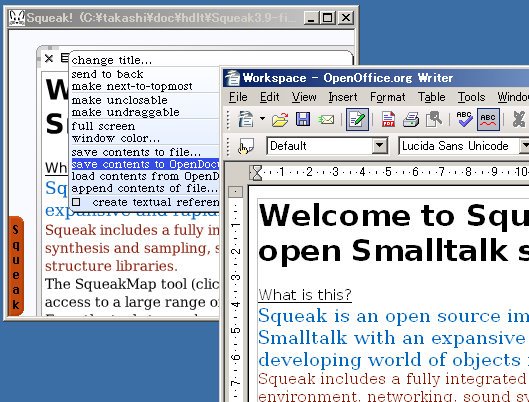
The end of last month, a french student asked me about my OpenDocumentFormat module for Squeak. ODF??? Yes, I have been written a ODF exporter based on Diego's stuff for a project. http://www.squeaksource.com/OpenDocument.html But I haven't maintenance for a while because I was busy for another project now. I was feeling somewhat guilty because it should be useful even on normal Squeak image if I put some fix. So actually his bug report was a good opportunity to clean up my code. And this is one. It works with Squeakland, Squeak3.8, and Squeak3.9 (YAXO is needed).

 Posted by Picasa

Thursday, September 08, 2005

UNDO!

To tell the truth, I haven't cared about UNDO in my work at all. Although I am really interested in brand new feature and fancy demonstration of computer programming, but I never have been concerned real user's experience. Ah, but the time seems to be coming to do about UNDO.

From the stand point of developer, I'm really taking care of undo. Programmer's undo is revision control systems. I love to use Monticello to manage my private project in Squeak, and Subversion for other stuff. I couldn't do anymore unless such system. So I realize that one interesting issue here is why undo system is implemented in various way?!

In minimal scale, we can use just undo key in your editor. Each application has its own undo policy. But the undo buffer is removed when the editor is shutdown. Revision control helps the situation. Besides, sometimes we use more file oriented backup system. So far, my company did differential backup for whole PCs at office into file server (I made the script in Perl). In any case, the goals are same, we want to back some point in history of our computing activity. Are there any core concept in?

Let's talk about other angle of undo. Sometimes undo is implemented as command pattern. Look, we have already have another commands in our etoys system, a tile, so we can imagine if undo buffer is made in etoys tiles. If so, one can learn how tile script is written looking undo history. This is basically same as macro recording (actually, I have learned emacs lisp to record/read macro scripts so far). To achieve such feature, all operation including painting a form and editing a text should be recorded as commands (as HyperTalk has all commands for menu / editor operation).

If all operation is recorded into undo buffer, we can see the undo buffer is document itself. That is an interesting side-effect. Instead of saving document data, we can save a sequence of command. The benefit of it would have a power of generalization. Documents, undo, playback, etc. are formed same way of commands.

To proceed this concept, you can see two different documents as two snapshot from same revision tree. Because certainly, a document is written from empty document. We could see any document of same application derives one root. Hence, any document of Squeak space is regard as different version of one big revision tree described in commands.

I know the idea is based on too simplification. I didn't care any performance issue neither space nor time. But it is important to start where the simple enough point.

Tuesday, September 06, 2005

Meeting with Julian

I had meetings with some NICT's researchers and Julian for these two days. Although I still felt slightly jet lag as I just had backed from L.A. on last Sunday, I was excited by a lot of interesting topic at the meeting. I also showed a demonstration about Chibi-Robo stuff. We were talking about to create 3-D scripting system. I realized this goal will be not easy as I expected. I regret my work should be stopped for a while to do another work, but I hope I will be able to make up more generic version. Most interesting topic came in the last dinner. Julian asked to one researcher to use iChat to corroborative work. Now we have enough infrastructure to use video conference, so it is free to use such tool whenever you need. Actually Julian said he already sets up iChat in his home during the entire day, it isn't necessary to turn off, and he can be chatting to his son whenever he want even he is on other side of the world. The important point is you don't need to disturb by noisy bells to aware enyone. One can look at peer not to be busy now nor not. I imagine the world where such video conference technology becomes just a trivial technique, as if today's HTTP or SMTP protocols, the applications of VOIP will become different than today's one (Croquet?!). Early web is just a thing for static document, but now it becomes more dynamic thing. Julian seems to try such experiment with his iChat.

Sunday, September 04, 2005

Implementation of TVML with Croquet

At last entry, I wrote the brief story of the Croquet project with NICT. But now, I am trying to describe more detail implementation of that project as I have a time on the airplane. In term of implementation, I could not say it was a good work. There were a lot of ad-hoc things, dirty patch, and less reusable. All the mess were from its primary goals. - Novice user can use. - Connect with P2P network more than 7 hosts. - The croquet space is regarded as if real NICT interior. Imagine these are not easy in current Croquet release as it is too early stage. For instance, the most strongest demand in here was we didn't have to show any error messages whenever a child touches anywhere, thus it needs a bunch of hooks in UI-related code. The lack of generalization was why I didn't show neither Squeak image nor source code of the project (I am ready to show you my source if you send me a mail). But I think I should contribute parts of codes for this project with some ways. Anyway, let's talk about points of the implementation. ** Describe animation as TVML script Honestly, the script that I described for the project was actually not TVML itself. Although much portion of the script was due to TVML, but I didn't TVML itself because; - Implementation of full set of TVML needs need effort. - I don't want to carry with new syntax into Smalltalk. Finally, the script I introduced looks like; - character:walk (name="Bob" x=10, y=0, z=10) (TVML notation) - Bob tvBehavior runSpec: #(walk x 10 y 0 z 10 length 1000). (Croquet notation) Basic idea is similar, but its expression is different. Croquet version is just a Smalltalk array, and it doesn't need the key "name" because the subject of the script is described as its receiver (Bob tvBavior references a TVML animation engine). Another significant thing is Croquet version stats the length of animation (by millisecond). The length of the animation was essentially platform dependence in original TVML (you can tune with magical numbers to try and error). But in Croquet, accurate timing was needed in network interaction. ** User interface For using as a direction board, I made the user interface be much simpler to eliminate walk-through motion, pop up menu, and dock menu. In stead of that, I put simpler UI. - Both right button and left button mean selecting menu. - The stand point of user does not move. - The degree of view can be moved by operation a mouse (180 width and 30 height). The main differences from regular Croquet is eliminating walk-through. In this work, User doesn't need to move the stand point. Besides, anyone can not make new objects or new windows. ** Network Network was the hardest work to do. Did you know current Croquet just supports up to 3-4 clients? I realize the fact when 3 days before of the demo, it makes my face pale with fear (I regretted I had been too late binder). The problem I met there was; - Become slow down. - A number of shared message was dropped down. - All host was down after one host was down. - Whenever one host is down, I have to restart all the host for synchronizing their states. I couldn't fix those problem in precisely right way as I had no time, but I managed the issue relatively ad-hoc way. - Each host has just atomic, limited states. - Reducing shared message (Cutting lasers, falling down, etc). - The interval of Heart beat (TeaParty>>runKeepAlive) was made longer. - Don't use TCP to avoid blocking. ** The fact we met from the "Open House" event. - It is hard to use if many user operate in same time. - The trackball has too many buttons. - Menus are too large for using in large display. - The pointer cursor is too small to see where is pointed. - It is hard to know each host is connected each other. - Out of memory happened each an hour.

Wednesday, August 03, 2005

TVML Crouqet exhibition

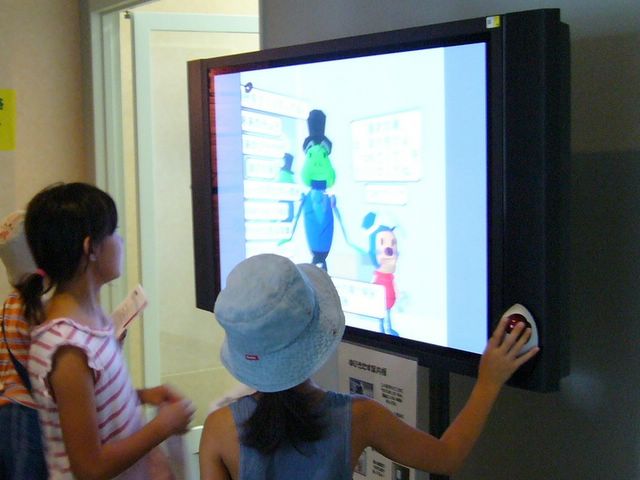
TVML Crouqet exhibition Posted by Picasa The final demonstration of my work about TVML + Croquet had finished last weekend in NICT "Open House" exhibition. We had up to 900 guests including families of the NICT reserchers in the exhibition one day. It was a very exciting day even I was lack of sleep... My work was a kind of computer guidepost. There were six connected Croquet client in varied places like the cafe, gallery, or so, and users can ask the computer the directions for a bunch of display items. In the screen, the space is build as same as actual place, and there is a robotic character named "Chibi-Robo", who leads user to right place. There are a couple of differences than usual Croquet application, most different thing is users never walk in the Croquet space. For example, a Croquet client placed at the cafe is always shows the cafe. If a user moves the mouse, the viewpoint is just rotated, but not moved. If a user wants to follow walking "Chibi-Robo", the user must walk to next Croquet client in actual space. When the user reaches next Croquet, wow! "Chibi-Robo" would be waiting for you in the host. There are six Crouqet, but there is only one "Chibi-Robo" in the space, so children (there are a lot of children!) have to run in the floor to chase Chibi-Robo. Honestly, a number of children played with Chibi-Robo, and began to like Croquet. I thought this was a succesful demonstration. In the technical degree, there were a couple of challenges. Especially, TVML animation and connected 6 hosts are very difficult thing. Actually, I had to reboot each 10-15 minutes for memory leak (about one hour per a host). That was tough experiment for Croquet.
 
Creative Commons License
This work is licensed under a Creative Commons Attribution 3.0 Unported License.